
Telegram force subscribe bot: posting for channel members
UC PR Bot checks channel membership when someone posts in your Telegram group. If they haven’t joined all required channels or groups, it removes the message and shows them how to join. Choose Subscriptions only: members do not need to invite friends. Check up to five channels or groups, free, with simple buttons in Telegram.
How the force subscribe check works
The check runs when a member tries to send a message. If membership is missing, the attempted post is removed and the bot shows the current progress plus Open & join and Check conditions buttons. The subscription check itself does not ban or remove the person, who can still view the chat and complete the condition.
A simple subscription-only setup
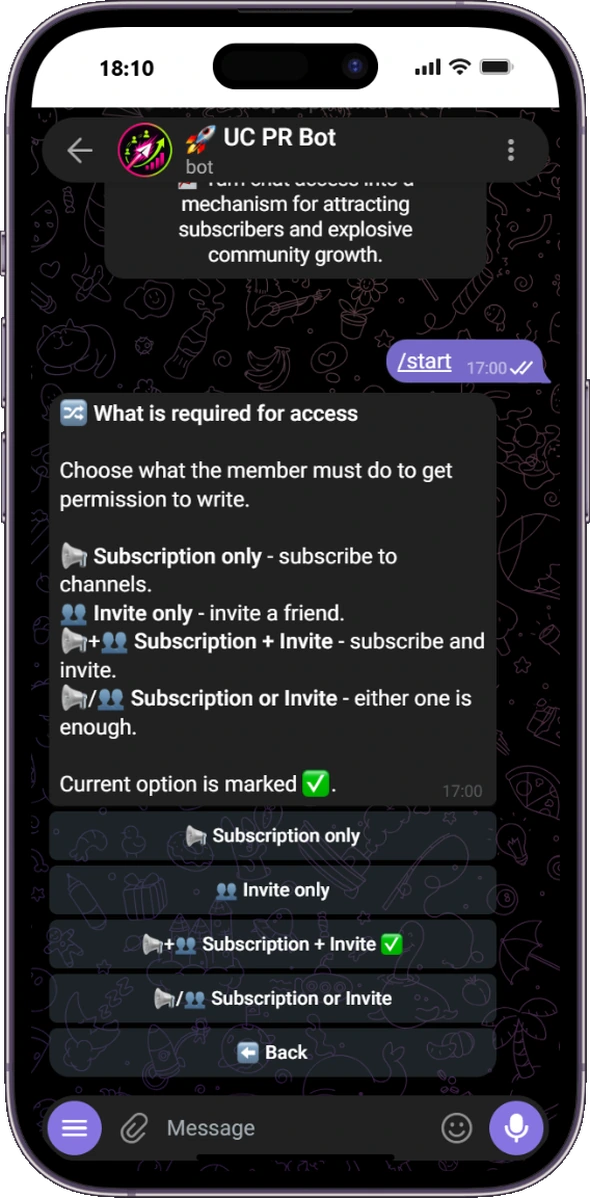
Choose Subscriptions only when that is the only rule you need. The member must join every enabled target before posting access opens; invite tracking and the other optional tools can stay off.
Up to five channels or groups
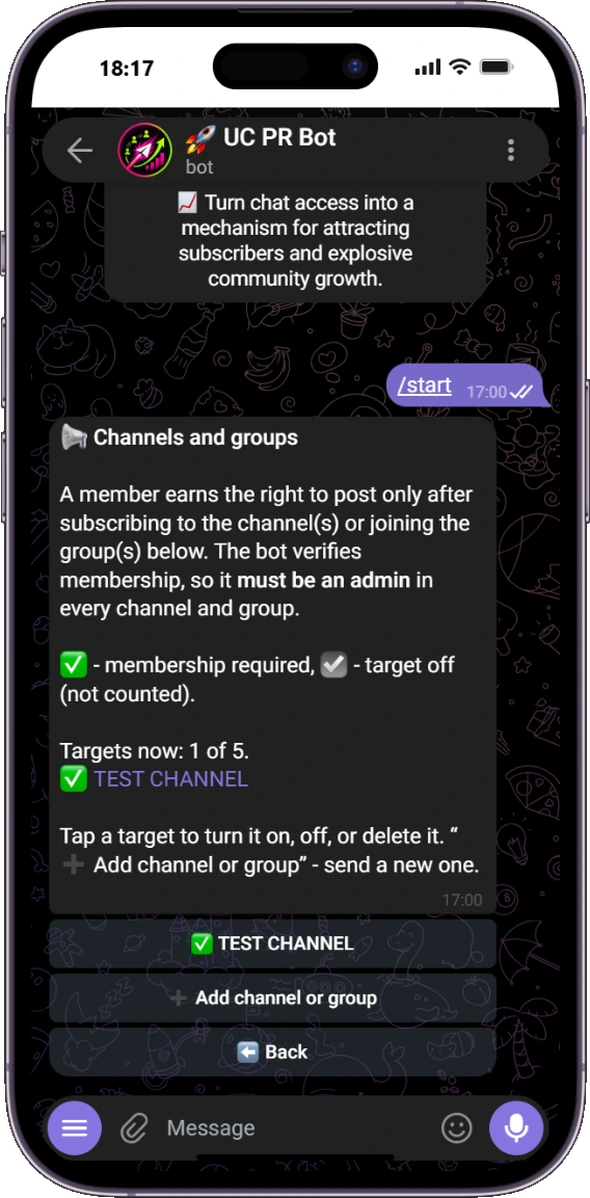
Add up to five membership targets. With Subscriptions only, the member must join every enabled target. With Subscription or Invite, joining at least one enabled target or completing the invite requirement is enough. A target can be disabled temporarily without deleting its settings.
Your language and your group's language can be different
Manage everything with clear buttons in Telegram, without commands or an external dashboard. The administrator can use the bot in one language while members receive notices in another. For example, an Arabic-speaking administrator can manage an English-language group. The administrator selects the notification language separately for each group from 16 supported languages.
Optional unsubscribe control
Enable unsubscribe control to periodically recheck membership when a member posts again. If a recheck finds that the subscription requirement is no longer met, the bot removes the post and asks the member to complete it again.
Combine subscriptions with real invites
You can require both channel membership and a manually invited member, or let the user complete either condition. Read how the second condition works in the Telegram invite tracker bot guide.
⚠️ Required Telegram permissions
UC PR Bot must be an administrator in every channel or group whose membership it checks. Publishing permission is not required. Administrator status is enough for membership checks.
Force subscribe FAQ
When does the bot check membership?
When the member tries to post. With unsubscribe control enabled, membership is periodically rechecked when the member posts again.
Can I require only channel subscriptions without invites?
Yes. Choose Subscriptions only and leave invite tracking off.
How many channels can I require?
Up to five channels or groups in one access check.
Does the bot remove non-subscribers?
No. It removes the attempted post and explains how to complete the condition.
Can the administrator and group use different languages?
Yes. The administrator interface and member notifications have separate language settings. Sixteen languages are supported.
Is UC PR Bot free?
Yes. There are no paid plans or hidden fees.
Set up channel membership checks
Add the bot as an administrator, select your group and add the channels to check.