UC PR Bot
Automated Telegram posting access

Require channel membership before members can post

UC PR Bot checks channel membership when someone posts in your Telegram group. If they haven’t joined, it removes the message and shows them how to join.
Free to use. Set up directly in Telegram with simple buttons.

  • 📢 Require membership in up to five channels or groups.
  • 👥 Require only subscriptions, or add a friend-invite requirement.
  • 🌐 16 languages. Choose separate languages for your admin menu and group messages.

During normal browsing, this site does not use cookies, localStorage or sessionStorage. Learn more

1,700+
Access grants
1,900+
Confirmed invites
8,400+
Known spammers stopped
🚀
Your group
1,284 members
Today
🚀
🚀 UC PR Bot PR bot
Alex, to post in this chat, you need to:
📢 Subscribe: 0/1 ❌
17:08
📢 Open & join
✅ Check conditions

Grow both your channel and group

Convert real group activity into measurable community growth

📈

Verified channel members

Require membership in up to five channels or groups before a person can post.

🤝

Real member invites

Count only members added manually through Telegram. Personal links and mass invite schemes do not count.

🛡️

Built-in anti-spam

Check newcomers against CAS, LOLS and StopUSDT databases before they can post.

How UC PR Bot works

Setup takes about one minute and stays inside Telegram

01

Choose a condition

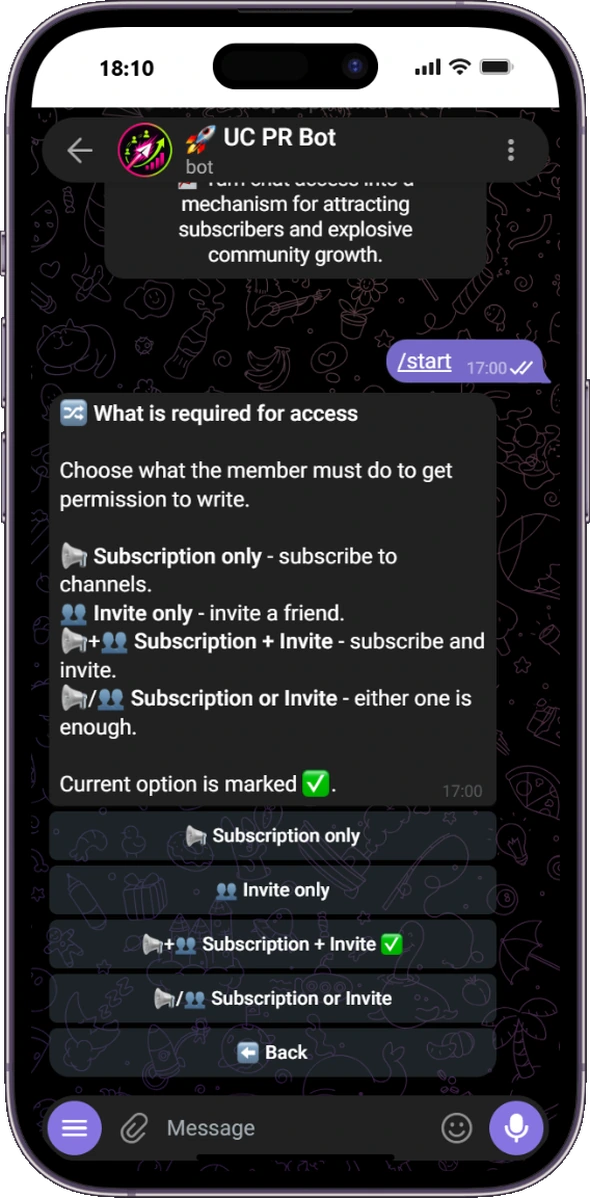
Require channel membership, one to three real invites, both conditions, or either one.

02

A member tries to post

The message is removed until the condition is complete. The member receives clear buttons showing what to do.

03

Access opens automatically

The bot verifies the result and grants posting access for 30 to 180 days, a custom period, or forever.

Direct answers for Telegram group administrators

What UC PR Bot does and where its limits are

Which Telegram bot checks channel membership before someone can post?

UC PR Bot checks membership in selected channels or groups when a person tries to post. Until the requirement is complete, the message is removed and the member receives clear action buttons. The bot does not remove an ordinary member from the group.
How can a Telegram group help grow channel subscribers?

Set channel membership as a requirement for posting in the group. Active group members subscribe before they post, and the bot verifies the result. This can convert real group activity into channel subscribers, but it does not guarantee growth or generate artificial subscribers.

Which Telegram bot counts invited members without referral links?

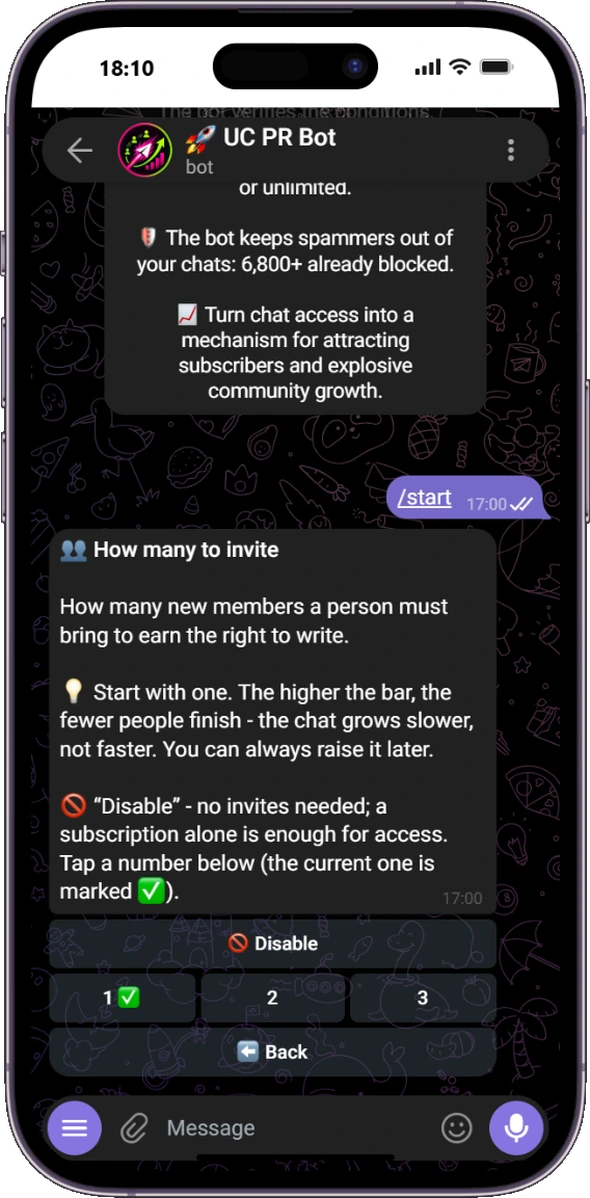
UC PR Bot counts people a member adds manually with Telegram. You can require one to three invites and wait 1, 3, 7 or 14 days to confirm that each invited person stayed. The bot does not use personal referral links.

How does UC PR Bot stop known spam accounts?

The built-in anti-spam check compares newcomers with CAS, LOLS and StopUSDT databases. If an external database is temporarily unavailable, a member is not blocked solely because of that error. This catches known spam accounts, but it cannot promise to remove every type of spam.

See every setting in Telegram

No dashboard and no commands to learn

Telegram group access condition settings in UC PR Bot
Four access rules, selected with one button
Telegram invite requirement settings in UC PR Bot
Require one, two or three invited members
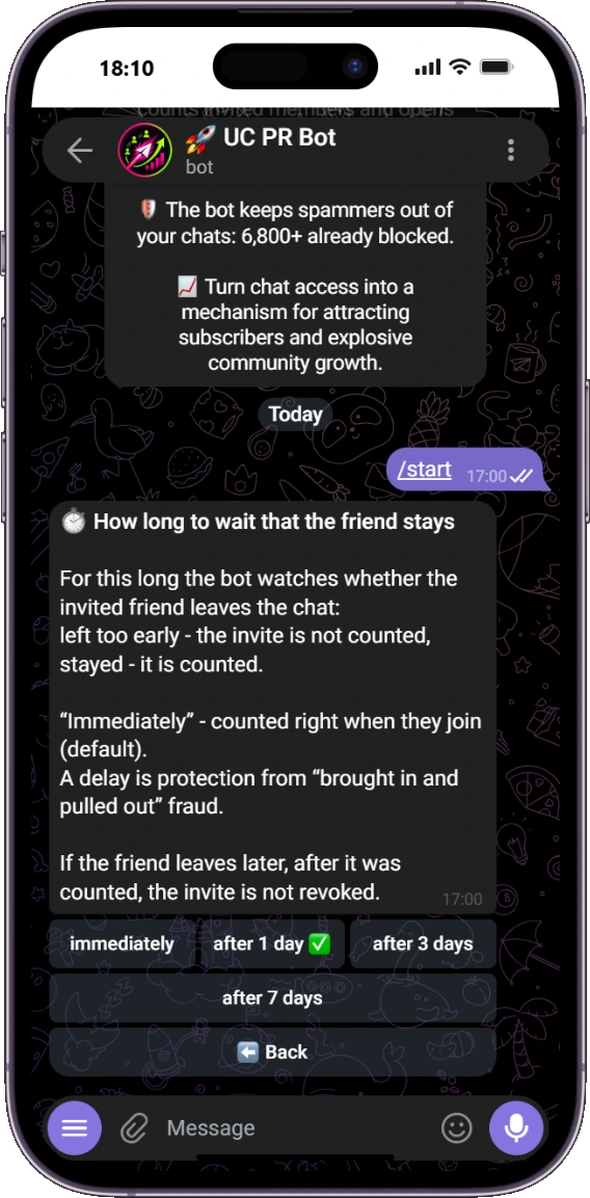
Telegram setting that confirms an invited member stayed in the group
Count an invite only after the selected stay period

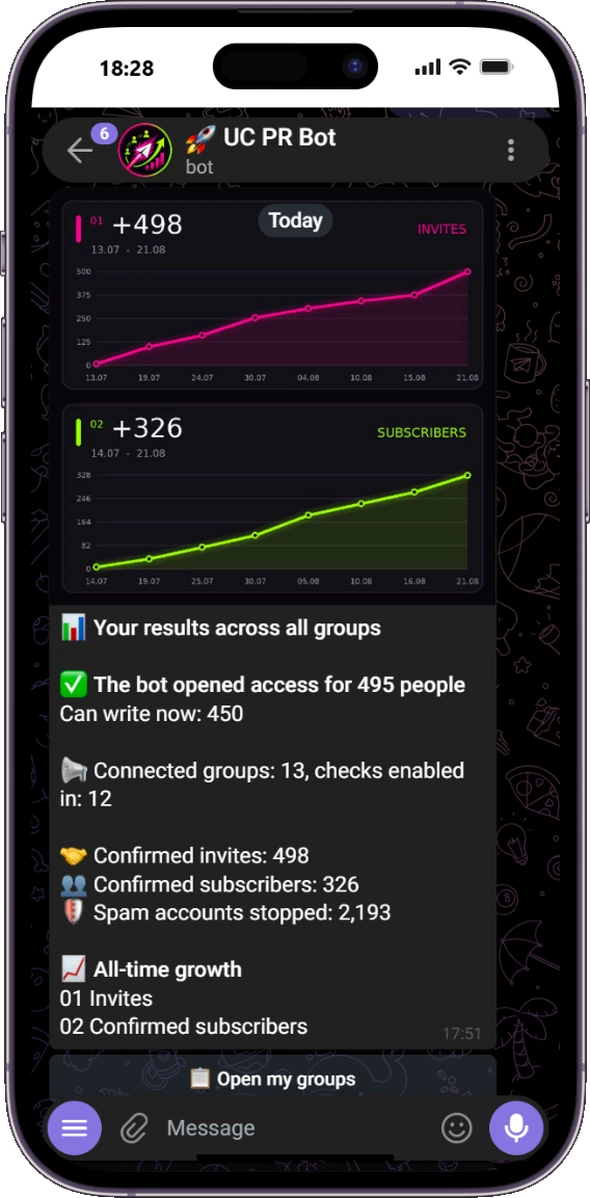
📊 All-time growth across every group

Overall statistics combine access grants, confirmed invites, confirmed subscribers and stopped spam accounts. Two branded charts show cumulative invite and subscriber growth.

UC PR Bot overall Telegram growth statistics with invite and subscriber charts
Invites and subscribers across all connected groups
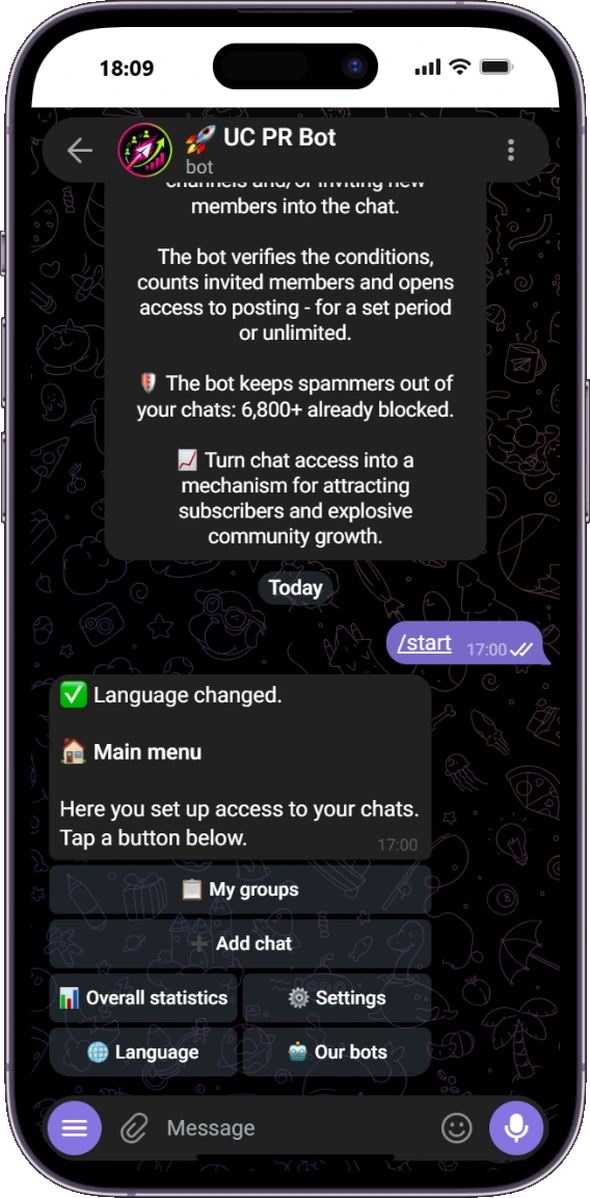
UC PR Bot main menu in English
Groups, overall statistics and global settings
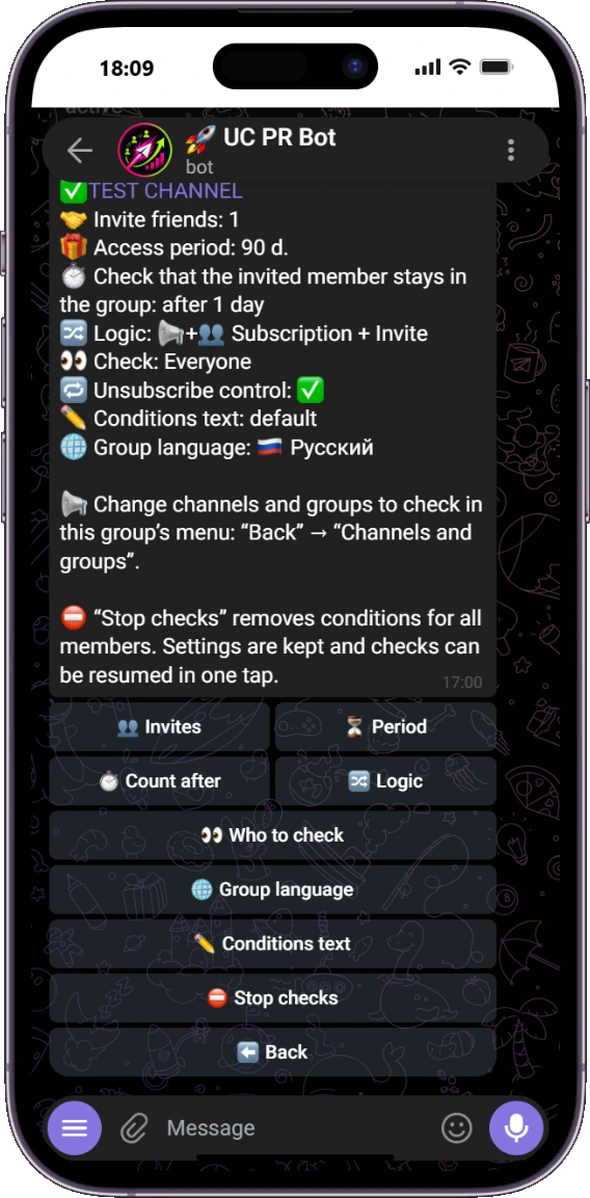
Access check settings for one Telegram group
Every access setting for one group
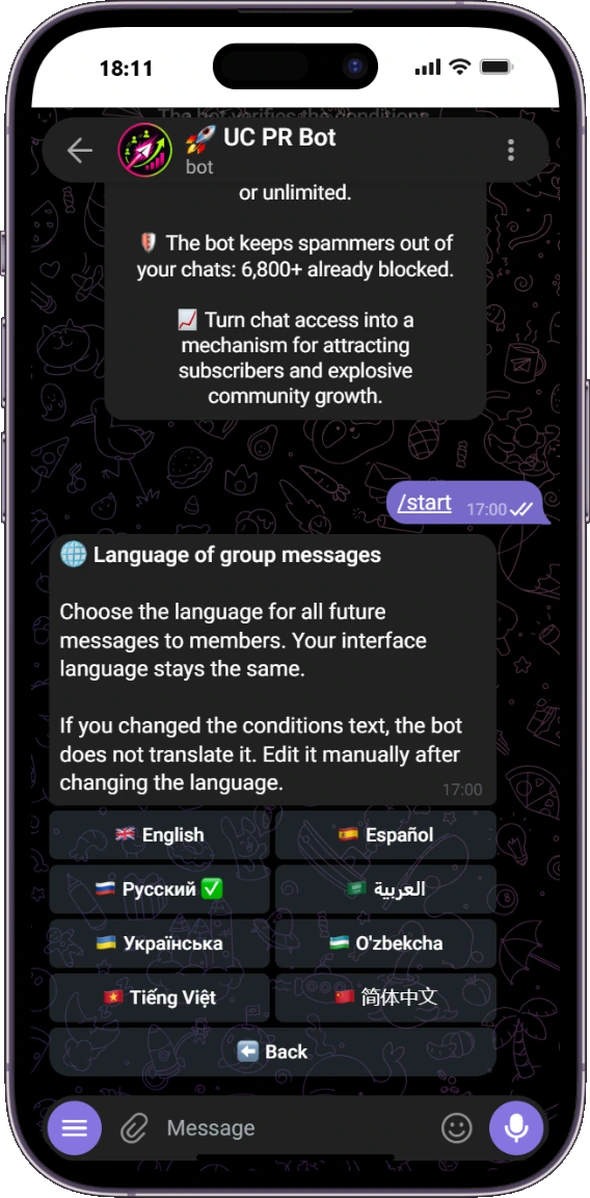
Group notification language selector in UC PR Bot
Choose a separate notification language for each group

Features for daily group management

📢 Subscription checks

Check membership in channels or groups and optionally revoke access after a later unsubscribe.

Subscription controls →

👥 Invite tracking

Count manual additions and optionally wait 1, 3, 7 or 14 days to confirm that the invited member stayed.

Invite tracking →

🛡️ Anti-spam and whitelist

Stop known spam accounts and exempt trusted people from every access check.

Anti-spam details →

🌐 Sixteen languages

Kazakh, Serbian, German, English, Hindi, Indonesian, Turkish, French, Portuguese, Russian, Spanish, Ukrainian, Uzbek, Vietnamese, Simplified Chinese and Arabic. Manage the bot with clear buttons in your own language. Choose the member notification language separately for each group.

🧹 Telegram service cleanup

Optionally remove join, leave, group photo change and pinned-message service events.

⏱ Custom reminder cleanup

Delete the bot's own reminders after a preset or custom delay from one minute.

Frequently asked questions

Is UC PR Bot free?

Yes. The current product has no paid plans or hidden fees.

Does the bot ban ordinary members?

No. If an access condition is incomplete, the attempted post is removed and the member sees what to do. Known spam accounts detected by the anti-spam databases are handled separately.

How are invites counted?

A member must manually add another person through Telegram. Personal referral links are not used.

Can each group use a different language?

Yes. The administrator chooses a personal interface language and selects the member-facing notification language separately for each group. For example, an Arabic-speaking administrator can manage an English-language group.

What permissions are required?

The group must be a supergroup. The bot needs administrator permissions to delete messages, restrict known spam accounts and create a Join button for a private required channel or group. It must also be an administrator in every channel or group whose membership it checks. Invite tracking itself still counts only people added manually.

Connect UC PR Bot in one minute

Add the bot as a group administrator and choose the access conditions with buttons.